
Clubhouse APK Download free for Android – Live Audio Rooms & Voice Chats 2026
| Updated | 07/11/2026 |
| Size | 122MB |
| Version | 26.11.03 |
| Requirements | 4+ |
| Downloads | 100K+ |
Description
Clubhouse is a social networking app built around live voice conversations. Instead of focusing on photos, short videos, or written posts, it gives people a place to talk about shared interests, listen to discussions, and meet others through audio rooms.
The Android app allows users to explore ongoing conversations, follow interesting people and topics, and participate in discussions from their phones. You can also create your own room and invite others to join.
For anyone interested in podcasts, casual discussions, professional networking, or meeting people with similar interests, Clubhouse offers a different way to interact online.
Table of Contents
How Clubhouse Makes Online Conversations Different
The main idea behind Clubhouse is simple: people connect through their voices.
When you open the app, you can discover conversations happening around different subjects. These discussions take place in virtual rooms where users can listen or request permission to speak.
Unlike traditional social networks, the experience is centered on real-time participation. You don’t need to prepare a video or write a long post before sharing an opinion.
Some conversations are casual, while others focus on particular interests, professional subjects, entertainment, or learning.
What You Can Do Inside a Clubhouse Room
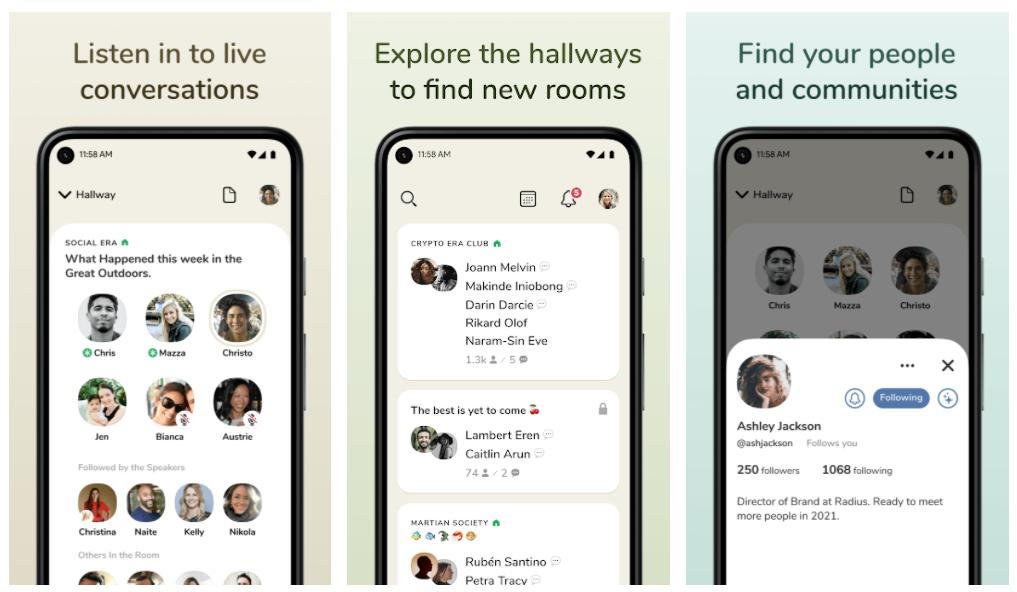
The app includes several features that shape how people communicate.
Listen to Live Discussions
You can enter available audio rooms and listen to conversations without immediately participating. This is useful when you want to understand a subject before sharing your own thoughts.
Discussions can cover anything from everyday experiences to specialist topics.
Join Conversations as a Speaker
If you have something to contribute, you can raise your hand to request speaking permission. Room moderators manage participation and decide who can join the conversation.
This makes it possible to move from listening to actively participating.
Create Your Own Audio Rooms
Clubhouse also gives users the option to host discussions.
You can create a room around a particular interest, invite people, and manage the conversation. For example, you could organize:
- A book discussion with other readers.
- A technology conversation with developers.
- A casual hangout with friends.
- A language-learning discussion.
- A community conversation about entertainment.
The platform also promotes opportunities for hosts to earn money through their rooms. Actual earning opportunities depend on the platform’s available features and eligibility requirements.
Discover People With Similar Interests
You can follow people and topics that interest you. This helps personalize the conversations and communities you discover.
Rather than browsing unrelated posts, you can spend time around discussions that match your interests.
Stay Connected Through the Sidebar
The app includes a sidebar where friends can continue conversations before, during, and after audio rooms.
It also supports communication when people are not online at the same time, making it easier to maintain connections beyond live discussions.
Finding Conversations That Match Your Interests
A useful way to get started is to explore different subjects before deciding which communities to follow.
For example, someone interested in technology might look for discussions about programming, mobile applications, or online businesses. Another person might prefer entertainment, books, personal development, or casual social conversations.
Following relevant people and topics helps shape what appears in your discovery experience.
You can also explore conversations outside your usual interests. This gives you an opportunity to hear different opinions and meet people with different backgrounds.
Clubhouse APK Version and Android Compatibility
The Android application is published by Alpha Exploration Co. and is available through Google Play.
As of November 7, 2026, the Google Play listing shows an update dated October 30, 2026. A third-party APK archive lists version 26.11.03, dated November 6, 2026, with Android 10.0 or later compatibility. These are separate listing records, so the third-party version should not automatically be treated as the latest Google Play release.
Here is the available app information:
| Detail | Information |
|---|---|
| App name | Clubhouse |
| Developer | Alpha Exploration Co. |
| Category | Social |
| Package name | com.clubhouse.app |
| App type | Social audio |
| File format | APK / XAPK, depending on source |
| Latest third-party listed version | 26.11.03 |
| Third-party listed Android requirement | Android 10.0+ |
| Google Play availability | Yes |
The actual file size and Android compatibility can differ depending on the release and device architecture.
Installing Clubhouse on an Android Phone
The easiest installation method is through Google Play. It provides the developer-published application and handles compatible updates automatically.
If you specifically need an APK file, follow these steps:
- Find a reputable APK distribution source.
- Check that the application name and developer match Alpha Exploration Co.
- Confirm the version and Android compatibility.
- Check whether the download is an APK or XAPK package.
- Download the appropriate file for your device.
- If Android requests permission, allow installation from that particular source.
- Open the downloaded package and follow the installation instructions.
- Disable the installation permission again when finished if you no longer need it.
A note about XAPK files: An XAPK package may contain additional application resources or split APK files. It might require a compatible package installer rather than the standard Android package installer.
For the official Android release, you can also visit the Clubhouse Google Play listing.
Getting Started After Installation
Once the application is installed, open it and follow the account registration or sign-in instructions displayed on the screen.
After accessing your account, you can:
- Explore available audio conversations.
- Follow topics and people.
- Enter a room as a listener.
- Request permission to speak.
- Create your own discussion room.
- Connect with friends through the sidebar.
A good starting point is to join a conversation about something you already understand. You can listen first and participate when you feel comfortable.
Making Your Clubhouse Experience More Useful
The quality of your experience largely depends on the conversations and communities you choose.
Here are a few practical suggestions:
- Follow relevant topics: Choose subjects you genuinely enjoy instead of following everything.
- Listen before speaking: Understanding the room’s discussion makes it easier to contribute.
- Participate respectfully: Give other speakers time to express their opinions.
- Create focused rooms: A clear discussion subject helps attract interested participants.
- Connect with interesting people: Following useful speakers can help you discover more relevant conversations.
If you enjoy exploring different forms of digital entertainment, you can also check out AniVibe APK.
Frequently Asked Questions
Is Clubhouse available for Android?
Yes. Clubhouse has an Android application published by Alpha Exploration Co. It is available through Google Play and can also be found through third-party APK distribution websites.
Can I listen to conversations without speaking?
Yes. You can enter available audio rooms as a listener. If you want to participate, you can raise your hand and request permission to speak.
Can I create my own room?
Yes. Users can create audio rooms around their preferred subjects, invite participants, and manage discussions.
Is Clubhouse free to download?
The application is listed as free on Google Play, although it includes in-app purchases.
Is Clubhouse still receiving updates?
Yes. Its Google Play listing shows an update on October 30, 2026, indicating that the Android application is still receiving updates.
Is downloading a Clubhouse APK safe?
The safety of an APK depends on its source and whether the package has been modified. Prefer Google Play or verify the developer signature when obtaining an installation package elsewhere. Avoid modified files from unknown websites.
Does Clubhouse support video calls?
The app’s current core experience is based on live audio conversations and voice rooms. Its Google Play description emphasizes audio rather than video calling.
Final Thoughts
Clubhouse offers a voice-centered approach to social networking. It allows people to discover live discussions, exchange ideas, meet others, and host conversations around subjects they enjoy.
Its Android application makes these activities accessible from a mobile phone, whether you prefer listening quietly or participating as a speaker.
If you enjoy real-time discussions and connecting with communities through voice, Clubhouse is worth exploring.
Download links
How to install Clubhouse APK Download free for Android – Live Audio Rooms & Voice Chats 2026 APK?
1. Tap the downloaded Clubhouse APK Download free for Android – Live Audio Rooms & Voice Chats 2026 APK file.
2. Touch install.
3. Follow the steps on the screen.
Related apps








Most viewed apps
-
 NBA 2K20 MOD APK+OBB Free Download: What to Know in 2026MOD99.0.5
-
 PinayFlix Mod APK 1.0 (No Ads) Download Free for AndroidMOD1.0
-
 Bappam TV APK Download 2026: What It Is & Better OptionsMOD2.0
-
 Apne TV Download for Android: Best Live TV Apps 20265.0
-
 Aarya Editz APK for Android 2026: Free Download & Full Review1.3
-